빌딩 블록
본 문서에서는 Fireship 에서 제공하는 기본 위젯들을 사용여 레고 블록을 쌓듯이 앱을 완성하는 방법을 설명한다. 물론 기본 위젯들의 소스 코드를 복사해서 자신만의 위젯으로 변형해서 사용해도 좋다.
에러 핸들링
Fireship 에서 제공하는 위젯 또는 로직에서 exception 을 발생 시키기도 한다. 이러한 exception 중에서 어떤 것은 fireship 내에서 핸들링되지 않는 경우가 있다. 즉, 앱 내에서 에러 처리를 해야하는 것이다.
앱 내에서 에러 처리는 일반적으로 많이 하는 runZoneGuarded 방식으로 하면 된다.
예제
runZonedGuarded(
    () async {
      runApp(const MyApp());
      /// Flutter error happens here like Overflow, Unbounded height
      FlutterError.onError = (FlutterErrorDetails details) {
        FlutterError.dumpErrorToConsole(details);
      };
    },
    zoneErrorHandler,
  );
  zoneErrorHandler(error, stackTrace) {
    print("----> runZoneGuarded() : exceptions outside flutter framework.");
    print("---> runtimeType: ${error.runtimeType}");
    if (error is FirebaseAuthException) {
      if (AppService.instance.smsCodeAutoRetrieval) {
        if (error.code.contains('session-expired') ||
            error.code.contains('invalid-verification-code')) {
          print("....");
          return;
        }
      } else {}

      toast(
          context: context,
          message: 'Error :  ${error.code} - ${error.message}');
    } else if (error is FirebaseException) {
      print("FirebaseException :  $error }");
    } else {
      print("Unknown Error :  $error");
      // toast(context: context, message: "백엔드 에러 :  ${error.code} - ${error.message}");
    }
    debugPrintStack(stackTrace: stackTrace);
  }
다국어
다국어를 쓰기 위해서는 iOS 에서는 Info.plist 에 아래와 같이 추가를 해 주어야 한다.
    <key>CFBundleLocalizations</key>
    <array>
        <string>en</string>
        <string>ko</string>
    </array>
그리고 앱에 적절히 언어 설정을 하고 TextService.instance.texts 에 국가별 언어를 설정하면 된다.
// 아래와 같이 원하는 언어를 추가하고,
TextService.instance.texts = {
  ...TextService.instance.texts,
    'login': systemLanguageCode == 'ko' ? '로그인' : 'Login',
};

// 아래아 같이 쓰면 된다.
Text('login'.tr);
로그인 관련 위젯
SimpleEmailPasswordLoginForm
간단한 email 과 비밀번호 로그인 기능을 제공한다. 이 위젯의 소스 코드를 복사해서 수정해서 쓰면 된다.
SimplePhoneSignIn
간단한 전화번호 로그인 기능을 제공한다.
예제
Scaffold(
  appBar: AppBar(
    title: const Text('전화번호 로그인'),
  ),
  body: Padding(
    padding: const EdgeInsets.all(lg),
    child: SimplePhoneSignIn(
      emailLogin: true,
      reviewEmail: Config.reviewEmail,
      reviewPassword: Config.reviewPassword,
      reviewPhoneNumber: Config.reviewPhoneNumber,
      reviewRealPhoneNumber: Config.reviewRealPhoneNumber,
      reviewRealSmsCode: Config.reviewRealSmsCode,
      onCompleteNumber: (value) {
        String number = value.trim();
        number = number.replaceAll(RegExp(r'[^\+0-9]'), '');
        number = number.replaceFirst(RegExp(r'^0'), '');
        number = number.replaceAll(' ', '');

        if (number.startsWith('10')) {
          return '+82$number';
        } else if (number.startsWith('9')) {
          return '+63$number';
        } else
        // 테스트 전화번호
        if (number.startsWith('+1')) {
          return number;
        } else if (number == Config.reviewPhoneNumber) {
          return number;
        } else {
          error(
              context: context,
              title: '에러',
              message:
                  '에러\n한국 전화번호 또는 필리핀 전화번호를 입력하세요.\n예) 010 1234 5678 또는 0917 1234 5678');
          throw '전화번호가 잘못되었습니다. 숫자만 입력하세요.';
        }
      },
      onSignin: () {
        context.pop();
        context.go(HomeScreen.routeName);
      },
    ),
  ),
);
Chat widgets
Whatever app that has the chat feature has common screens and widgets.
Chat room list
To list chat rooms that the login user joined, use DefaultChatRoomListView widget. You can use the options to customize. Or simply copy all the code of the widget and customize with your own code.
Chat room create
쓰기 쉬운 가편한 위젯
LabelField
위젯 항목을 참고한다.
사용자 프로필 스티커 표시 - MyProfileSticker
사용자 프로필 스티커는 아래의 사진 처럼 왼쪽에 로그인 한 사용자의 사진, 오른쪽에 프로필 수정 버튼, 그리고 중앙 상단에 이름, 중앙하단에 상태 메시지를 표시해 주는 위젯이다.
디자인 변경은 Theme 위젯으로 하고, 필요한 경우, 소스 코드를 복사해서 수정하여 사용하면 된다.
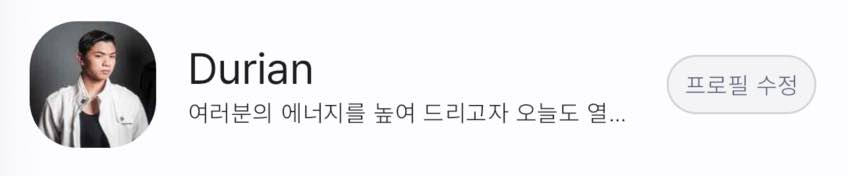
아래의 코드는 Sliver 스크롤 뷰에 추가한 것으로 프로필 수정 버튼의 디자인을 변경 한 것이다. 이 처럼 디자인은 소스 코드를 수정하지 않고 얼마든지 변경 할 수 있다.
SliverToBoxAdapter(
  child: Theme(
    data: Theme.of(context).copyWith(
      chipTheme: ChipThemeData(
        padding:
            const EdgeInsets.symmetric(vertical: 0, horizontal: 0),
        backgroundColor: context.onSurface.withAlpha(10),
        side: BorderSide(color: context.onSurface.withAlpha(20)),
        shape: RoundedRectangleBorder(
          borderRadius: BorderRadius.circular(20),
        ),
        selectedColor: context.primary,
        labelStyle:
            Theme.of(context).textTheme.labelMedium!.copyWith(
                  fontSize: 14,
                  fontWeight: FontWeight.w400,
                  color: context.onSurface,
                ),
      ),
    ),
    child: const MyProfileSticker(),
  ),
),
사용자 목록 - NewProfilePhotos
사용자가 사진을 변경하면, /user-profile-photos 에 복사된다. NewProfilePhotos 는 이 값을 바탕으로 사용자의 사진을 화면에 표시한다.

예제
NewProfilePhotos()